The First 30 Days Back: How to Revive a Dead Instagram Account Without Starting Over

Your reach is in single digits. Your last post was months ago. Your follower count hasn't moved in either direction, which might actually be worse than losing followers — it means nobody's paying attention at all.
You're staring at your Instagram account and asking the question every social media manager eventually faces: “do I try to bring this back, or do I torch it and start over?”
Here's what I think: in most cases, starting over is a waste. You've got followers, even if they're quiet. You've got historical data, even if it's not flattering. And you've got a username, a brand identity, and the bones of something that worked at some point.
What you need isn't a new account. You need the right 30 days.
This is the playbook I'm using to bring back my own account — @thesocialdollhouse — from a reach of 3 (yes, three) to something that actually functions. I'm not going to pretend I have it all figured out. But I am going to show you exactly what I'm doing, why, and what happens.
If your Instagram account has been dormant and you're ready to revive it without starting from scratch, this is the strategy.
What "Dead" Actually Means — And Why It's Not As Bad As You Think
First, let's be precise. There's a difference between a dead account, a dormant account, and a deprioritised one. The distinction matters because the recovery strategy is different for each.
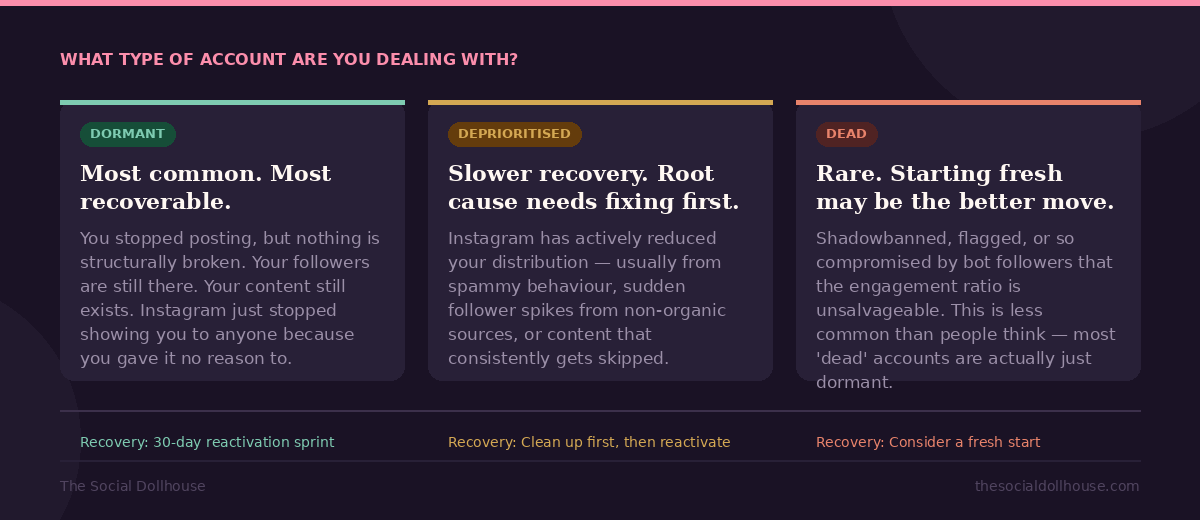
Here's a quick diagnostic to figure out which category you're in:
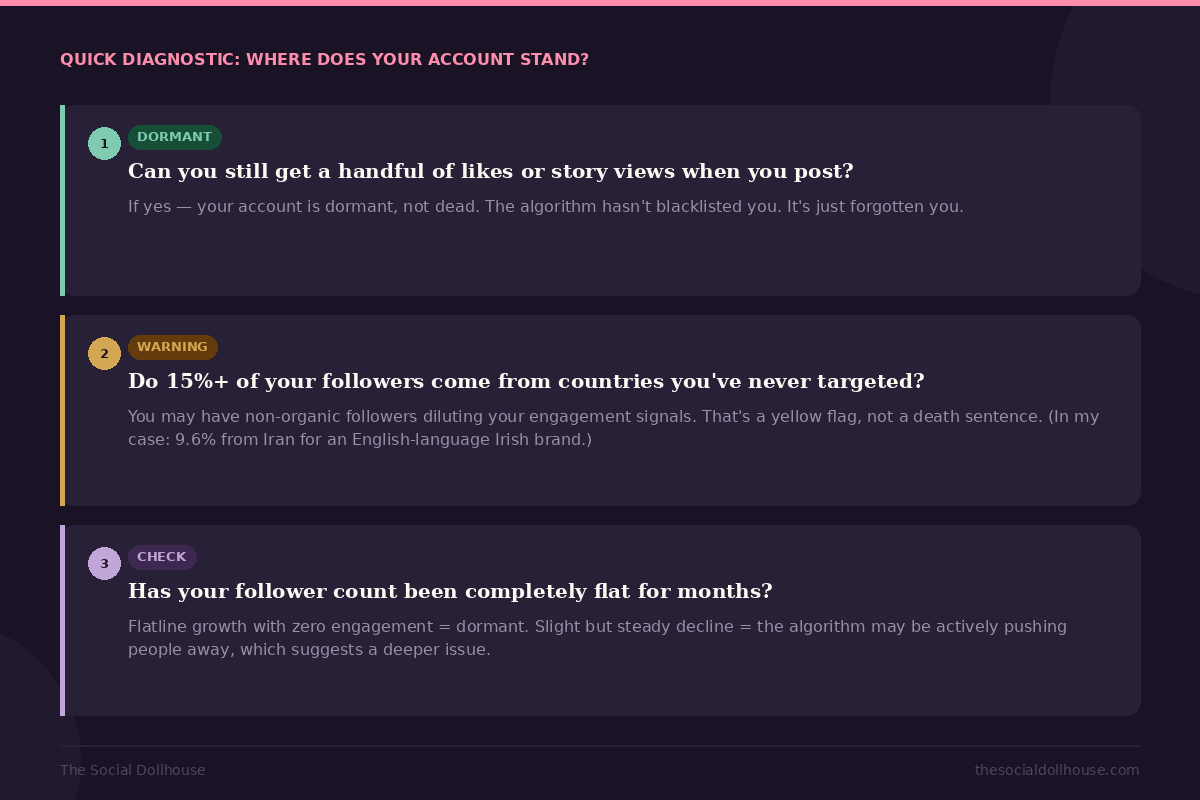
Most of the time, the answer is: your account is dormant, the algorithm deprioritised you because you stopped feeding it, and the fix is a structured, sustained return to activity. Not a rebrand. Not a new handle. Just a strategy.
The Instagram Algorithm Reset: What Actually Happens When You Go Quiet
Here's something that most "just post consistently" advice never explains: why does the algorithm stop showing your content after a gap?
Instagram's distribution system works on recency and engagement velocity. When you post, the algorithm shows your content to a small slice of your audience first — typically your most engaged followers. If that initial group interacts with it (likes, comments, saves, shares, watch time), the algorithm expands distribution to more people. If they don't, it stops.
When you haven't posted in months, two things break down simultaneously.
First, your "most engaged followers" cohort has decayed. People who used to interact with your content have stopped seeing you in their feed entirely. They've been engaging with other accounts instead, and the algorithm has learned to deprioritise you in their feed. You're not blocked — you're buried.
Second, Instagram has no recent data to work with. The algorithm makes predictions based on patterns, and if your last data point is from 10 months ago, there's nothing to predict from. So it defaults to showing you to almost nobody.
This is why the first week back is so critical. You're not just creating content — you're re-training the algorithm to recognise you as an active account that deserves distribution. And there's a specific order of operations that works better than just publishing a Reel and hoping for the best.
Week 1 — Re-Signal Activity Without Looking Desperate
The instinct when reviving a dormant Instagram account is to go all-in immediately: film five Reels, post them all, and pray. I'd argue that's the worst thing you can do in week one.
Here's why: if your first post back gets 12 views and zero engagement (which it probably will, because the algorithm hasn't warmed up to you yet), that becomes your new baseline. The algorithm sees a post that nobody cared about and uses that signal to suppress your next post even further. You've just dug yourself deeper.
Instead, week one should focus on something that doesn't require the algorithm to cooperate at all: Stories and direct engagement.
The Stories-First Strategy
Stories don't depend on algorithmic distribution the way feed posts and Reels do. They appear at the top of the feed for your existing followers, and they serve a fundamentally different purpose in week one: they remind people you exist.
Post 3–5 Stories per day in your first week. Keep them low-effort but on-brand — behind-the-scenes of what you're working on, a quick poll, a question sticker, a casual "I'm back, here's what I've been building." The goal isn't virality. The goal is to get your existing followers tapping, replying, and re-engaging with you at the most basic level.
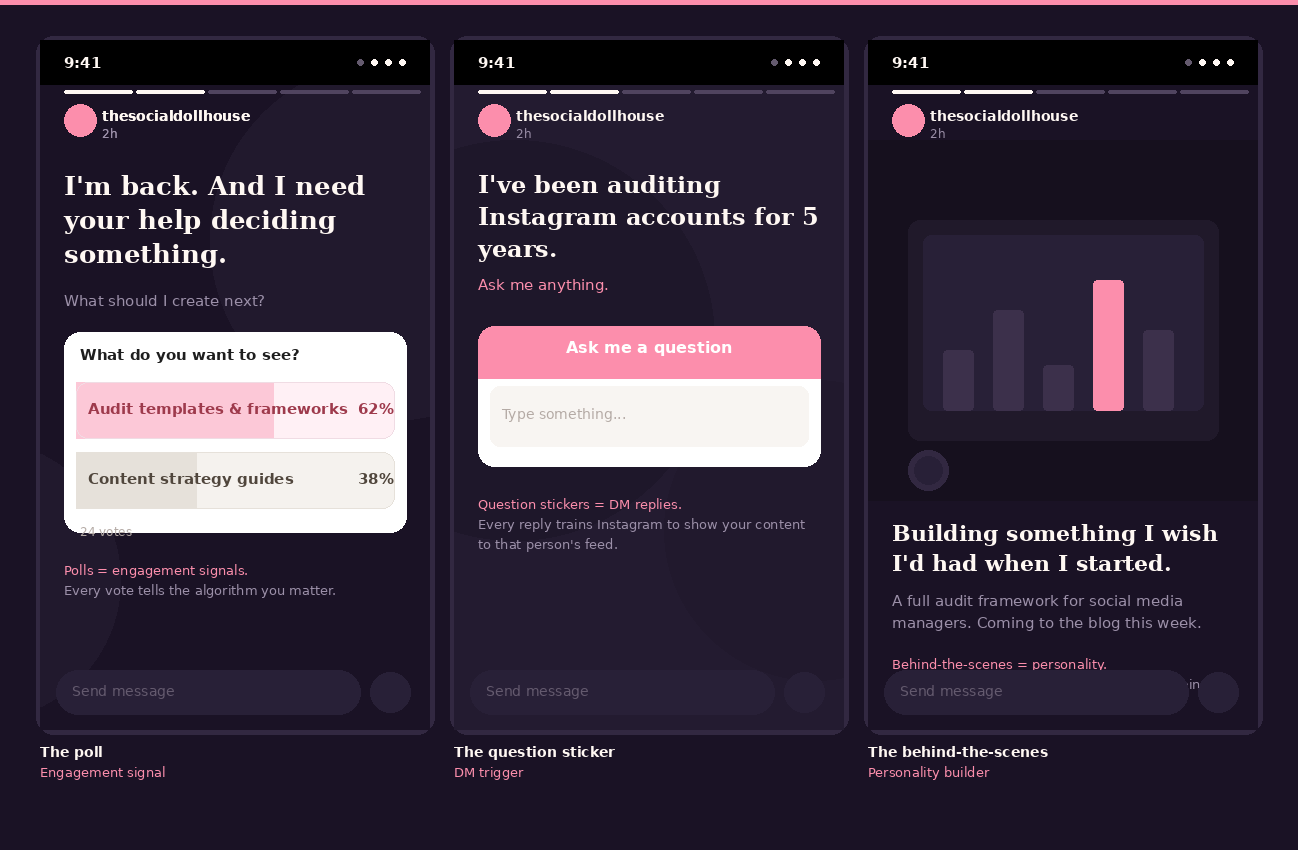
Every Story reply, every poll vote, every sticker interaction sends a signal to Instagram: this person's audience is paying attention. That signal matters enormously for what happens in week two when you start posting to the feed.
The Engagement Sprint
Alongside your Stories, spend 20 minutes a day doing something that most "content strategy" advice ignores: proactive engagement on other people's posts.
Go to accounts in your niche — other social media managers, content creators, digital marketing educators — and leave genuine, thoughtful comments on their recent posts. Not "love this!" — something specific that adds to the conversation. Do this on 15–20 posts per day.
This does three things. It puts your profile in front of new people (anyone who reads the comments might tap through to your profile). It re-signals to Instagram that your account is active and participating in the ecosystem. And it starts to build the reciprocal engagement patterns that the algorithm rewards.
What You're NOT Doing In Week One
You are not posting Reels. You are not launching a content series. You are not announcing a "comeback." All of that comes later, when you've built a foundation of recent activity signals. Week one is the warm-up. It's not glamorous, but it's what makes everything after it work.
Week 2 — Your First Feed Posts (and why most people get this wrong)
By the end of week one, you should have a few hundred Story views, some DM replies, and a general sense that your existing followers know you're active again. Now it's time to hit the feed.
The One Lesson That Cost Me 350 Views
Here's something I learned from my own data: I once posted three near-identical Reels on the same day. All three promoted the same product with very similar captions. The first one got 361 views. The second got 21. The third got 5.
Instagram's algorithm saw the first post, showed it around, and when the second one arrived 30 minutes later with basically the same content, it suppressed it. The third was buried completely. I essentially cannibalised my own reach by competing with myself.
The takeaway for your comeback: one post per day, maximum. And each post should feel distinctly different from the last — different topic, different format, different energy. Variety signals to the algorithm that you're a creator worth distributing, not a bot repeating itself.
What To Post First
Your first feed post should be a piece of educational or value-driven content — not a product promotion, not a "welcome back" post, and definitely not a selfie with a caption about your journey.
The reason: educational content gets saved. Saves are the most powerful engagement signal on Instagram right now. When someone saves your post, they're telling the algorithm "this is worth coming back to," and that signal carries more weight than a like or even a comment.
Think about what your ideal follower would genuinely find useful. For social media managers, that might be: a framework they can apply immediately, a mistake to avoid, a metric they're probably not tracking, or a tool recommendation they haven't heard of.
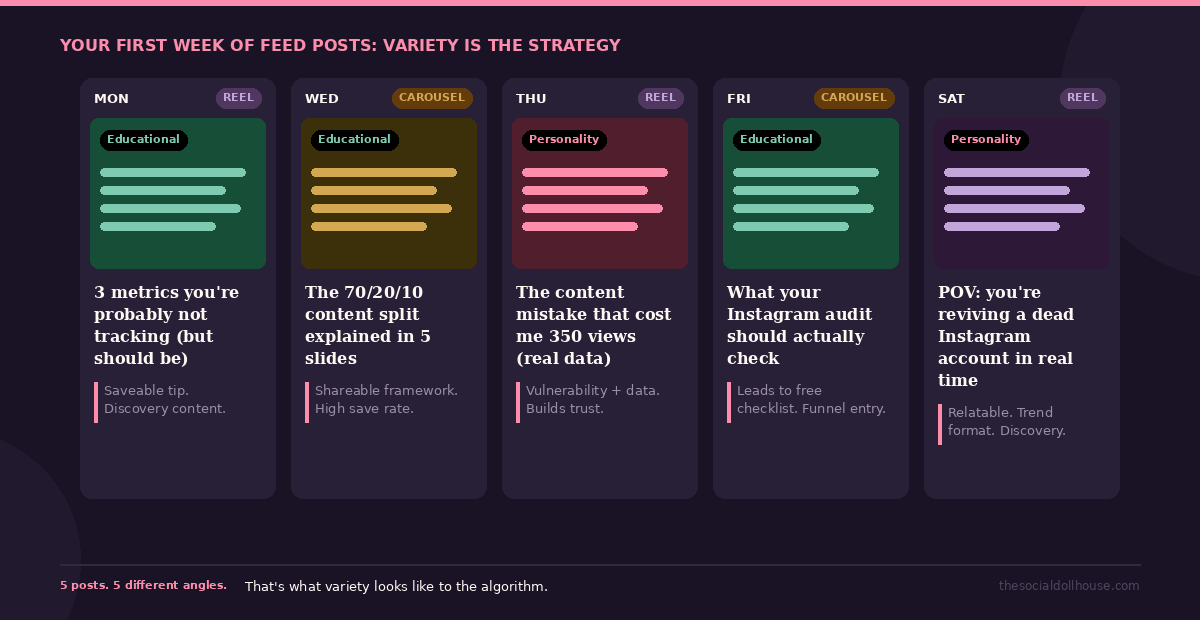
Post this as a Reel (under 60 seconds, text overlay format works well for this) or a carousel. Both formats get distributed more broadly than static images.
The Posting Cadence For Week Two
Aim for 4–5 feed posts across the week. Not all on one day. Not with a rigid schedule. Just a steady presence that tells the algorithm: this account is back, it's producing content people interact with, and it's worth showing to more people.
After each post, check back in 30 minutes and reply to every single comment. Respond to DMs that come in. Post a Story that references the feed post ("just posted something about X — what do you think?"). This kind of cross-pollination between feed, Stories, and DMs creates a web of activity signals that the algorithm responds to.
Weeks 3–4 — Building Momentum Without Burning Out
By week three, you should start seeing your reach climb from the single digits to something more meaningful. It won't be dramatic — don't expect viral numbers. But if your first post hit 50 people and your fifth post is hitting 150, you're on the right trajectory.
This is where most comeback attempts fail. The initial adrenaline wears off, the numbers still feel small, and the temptation to either quit or post frantically kicks in. Neither helps.
The 70/20/10 Content Split
This framework was in the audit action plan for my own account, and it's the structure I'd recommend for anyone in the recovery phase:
70% educational and value content. Tips, frameworks, how-tos, mistakes to avoid, industry observations. This is your discovery engine — the content that Instagram shows to people who don't follow you yet. It's what expands your reach.
20% personality and relatability. Behind the scenes, your opinions, your process, day-in-the-life moments. This builds connection with the people who found you through the educational content. It's what makes them follow you and stay.
10% promotional. Your products, your services, your offers. This converts the people who already trust you. It's the smallest slice because it only works after the other two have done their job.
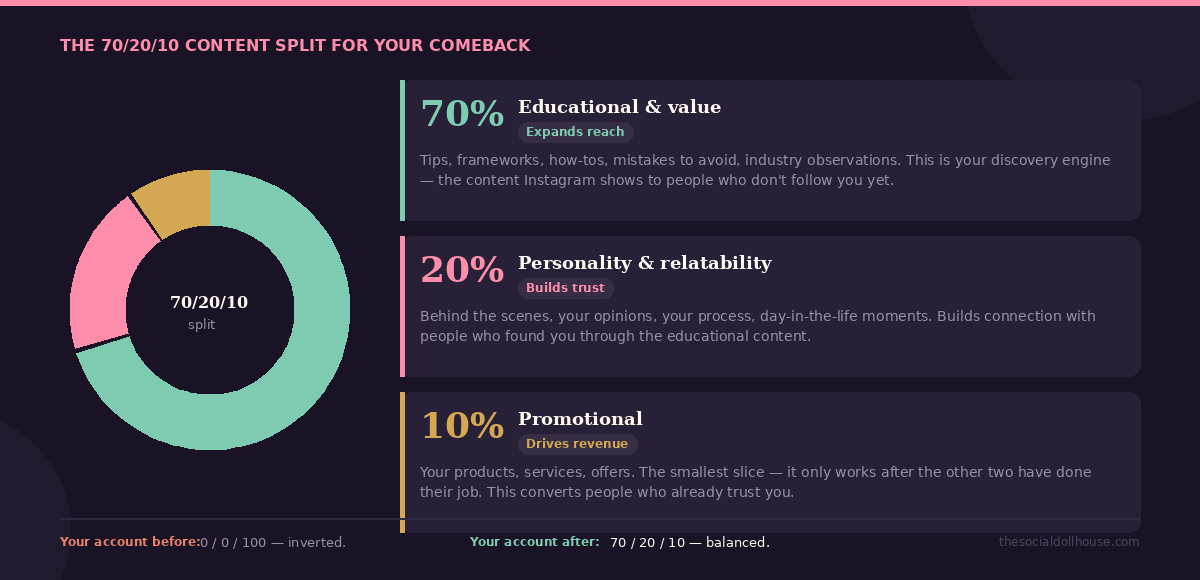
If you've been posting 100% product promotion (which, if I'm being honest, is exactly what my account was doing), this ratio is going to feel strange. You'll feel like you're giving away too much for free. You are. That's the point. The free content is the investment; the trust it builds is the return.
Reading Your Early Metrics
In weeks 3–4, you're looking for trends, not absolutes. The specific numbers matter less than the direction they're moving.
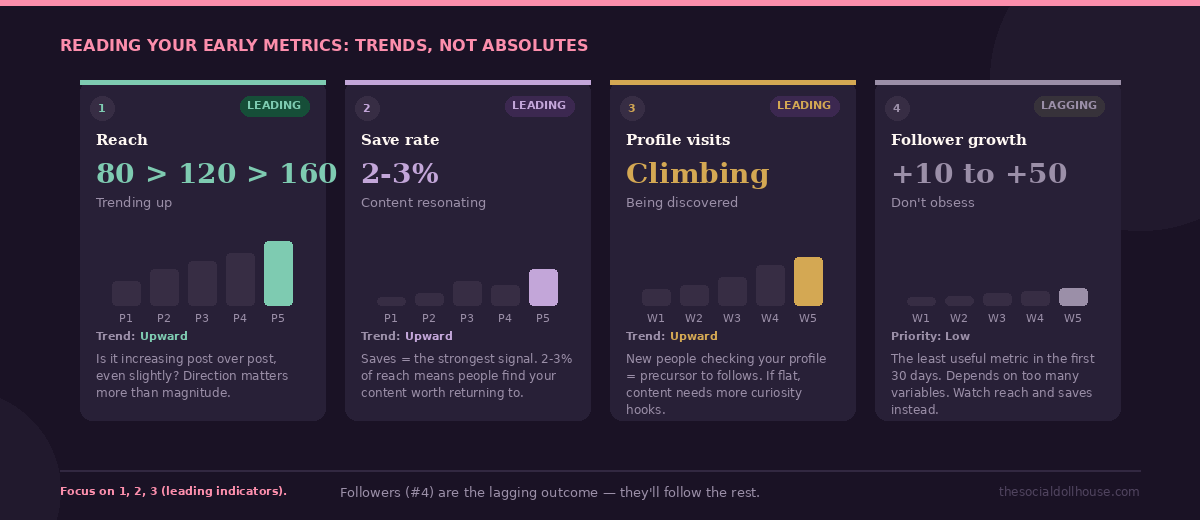
Reach: is it increasing post over post, even slightly? A move from 80 to 120 to 160 matters more than hitting 10,000.
Save rate: are people saving your posts? If you're getting saves on 2–3% of your reach, your content is resonating. If saves are zero, your content is being seen but not valued — which means the topic or format needs adjusting.
Profile visits: are new people checking out your profile after seeing your content? This is the precursor to follows. If profile visits are climbing, you're being discovered. If they're flat, your content might be useful but not curiosity-inducing enough to make someone want to see more.
Follower growth: the least useful metric in the first 30 days. Seriously. You might gain 10 followers or you might gain 50 — it depends on too many variables to be diagnostic this early. Don't obsess over it. The leading indicators are reach, saves, and profile visits. Followers are the lagging outcome.
The 30-Day Check-In: What Realistic Recovery Actually Looks Like
I want to be direct about expectations, because most content about Instagram comebacks implies that you'll be back to full speed in a month. You won't.
A realistic 30-day outcome for a dormant account with 1,000 followers looks something like this: reach moving from near-zero to 200–500 per post. Engagement rate between 3–6%. A handful of new followers per week, mostly from the educational content. Story views climbing from a few dozen to a few hundred. And — this is the one that matters most — a clear, visible upward trend in your analytics that tells you the strategy is working.
That's not exciting. It's not viral. But it's real, and it's the foundation that everything else gets built on. Months two and three are where the compounding starts to kick in — but only if month one was consistent.
What I'd Do Differently
If I were starting this process over, I'd change two things. First, I'd batch-create my first two weeks of content before posting anything. The biggest risk to a comeback strategy isn't a bad post — it's the gap between posts. When you're creating in real time, life gets in the way and the gaps creep back in. Batch creation removes that risk.
Second, I'd focus my first five posts on a single content pillar rather than spreading across multiple topics. When the algorithm is re-learning who you are, giving it a clear signal ("this account teaches social media strategy") is more effective than being a generalist. You can diversify later. Early on, clarity beats variety.
When You're Ready to Run This as a Proper Audit
Everything in this post gives you the thinking behind a comeback — what to check, what to fix, and in what order. If you have worked through the checklist, you already have a clearer picture of your account than most people ever get.
But there is a difference between knowing what needs to change and having a structured system to actually document it, track it, and act on it — especially if you are doing this for clients or want to treat your own account with the same rigour.
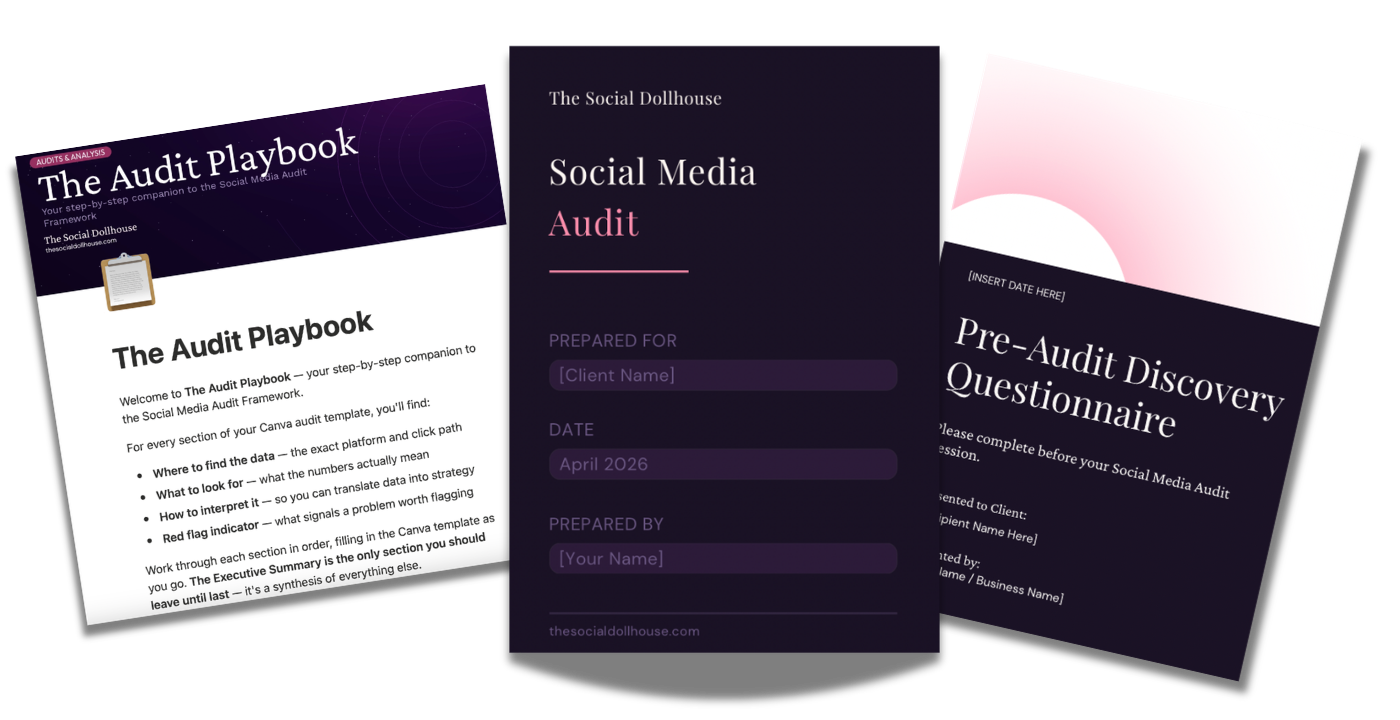
That is what the Social Media Audit Framework is built for. It is a 16-page Canva framework that walks you through every layer of an Instagram audit — profile setup, content performance, audience analysis, engagement patterns, and a strategic action plan — with guided sections and prompts so you are never staring at a blank page wondering what to assess next.
You plug in the data. The framework structures the thinking. And what comes out the other end is a professional, client-ready audit you can deliver with confidence — or use on your own account every time you need to reset and recalibrate.
It is the same structure behind the audit process in this post, except instead of building it from scratch each time, the template does the organising for you. Reusable for unlimited clients. Fully editable. Ready to use today.